How to get the Pixel Dailer on other devices.[Guide]
So as you all know Google recently released its new set of Pixel phones with the all new Android 7.1 Nougat on board. This currently is the only phone that runs this version of android and thus there are several things that are exclusive to the Pixel only. One such thing is the dailer app.
However there is a way to get the app for yourself. If you want to get the new dailer app then follow this quick and easy guide. The new pixel dialer is just an update to the existing phone dialer on nexus phones. Therefore this will only work on phones which are running Android 6.0 and above. Ive seen google nexus phones and several Samsung flagships running this version of the dialer app but im pretty sure that other phones running android marshmallow will also be capable enough to run it.
So first of all what you need to do is to go into settings > security and check unknown sources. This is so that you can sideload apps onto your phone. Then go to this link and download the apk file for the dialer. Now after you download the file, click on it. This will take you to the installation screen. If you already have a google dialer installed on your phone , and you most probably will if you have a nexus device, you will be prompted to update the existing app. However if you dont already have the Google phone app on your phone, you will just be prompted to install the app. Either way, tap on install/update to successfully install the app onto your phone.
After successfully installing the app you want to set it as the default app to make and receive phonecalls. If Google phone was already your default dialer, you can skip this part but if not then follow along. Head to the apps settings and tap the little gear icon in the top right corner. From here, select "phone app" and select the app that you just installed. If you have multiple phone apps then just select the app with the blue material designed phone icon.
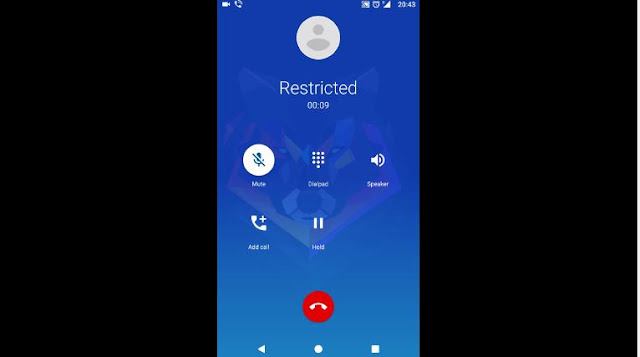
Once set up, You are good to go. The main Interface is pretty much the same and is very identical to the previous version of the Google phone app however things differ in the actual call UI. When you are in the call UI , you will see your main desktop wallpaper as a background image as opposed to a generic blue background from before. Now, The contact photo is how you would answer or reject calls and if you notice the whole things is very similar to Google's duo video calling app. After you pick up, the In Call UI gives you the same background as before and provides you with all the functions that you also previously had on older versions of the app such as the mute, dialpad,speaker, add call and hold button as you can see in the picture above. The overall design is pretty polished and well thought out.
Do try out the app yourself if your phone supports it and let me know down in the comments section your thoughts on the new dialer app.
However there is a way to get the app for yourself. If you want to get the new dailer app then follow this quick and easy guide. The new pixel dialer is just an update to the existing phone dialer on nexus phones. Therefore this will only work on phones which are running Android 6.0 and above. Ive seen google nexus phones and several Samsung flagships running this version of the dialer app but im pretty sure that other phones running android marshmallow will also be capable enough to run it.
So first of all what you need to do is to go into settings > security and check unknown sources. This is so that you can sideload apps onto your phone. Then go to this link and download the apk file for the dialer. Now after you download the file, click on it. This will take you to the installation screen. If you already have a google dialer installed on your phone , and you most probably will if you have a nexus device, you will be prompted to update the existing app. However if you dont already have the Google phone app on your phone, you will just be prompted to install the app. Either way, tap on install/update to successfully install the app onto your phone.
After successfully installing the app you want to set it as the default app to make and receive phonecalls. If Google phone was already your default dialer, you can skip this part but if not then follow along. Head to the apps settings and tap the little gear icon in the top right corner. From here, select "phone app" and select the app that you just installed. If you have multiple phone apps then just select the app with the blue material designed phone icon.
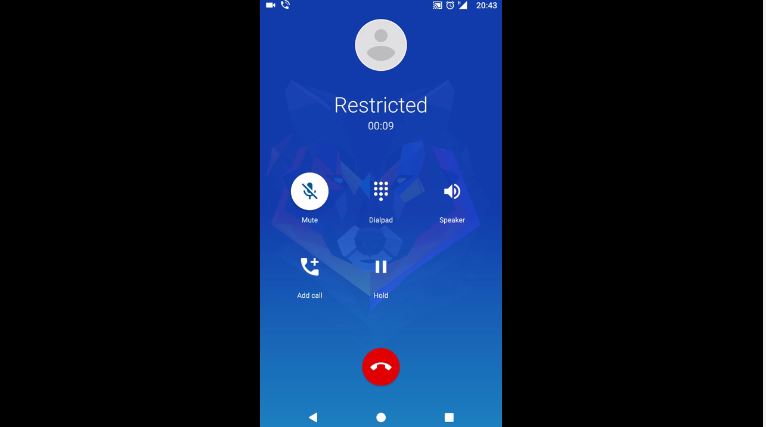
Once set up, You are good to go. The main Interface is pretty much the same and is very identical to the previous version of the Google phone app however things differ in the actual call UI. When you are in the call UI , you will see your main desktop wallpaper as a background image as opposed to a generic blue background from before. Now, The contact photo is how you would answer or reject calls and if you notice the whole things is very similar to Google's duo video calling app. After you pick up, the In Call UI gives you the same background as before and provides you with all the functions that you also previously had on older versions of the app such as the mute, dialpad,speaker, add call and hold button as you can see in the picture above. The overall design is pretty polished and well thought out.
Do try out the app yourself if your phone supports it and let me know down in the comments section your thoughts on the new dialer app.


